v2.6: Full Game on Windows and Linux — Nexus Forge, Terminal Git, Three Monero Tools
Screenshot 2026 11 14 134803

Screenshot 2026 11 14 135443

nexushacker is leaving the browser — a dedicated Windows installer and a Linux AppImage / Debian package are live, with offline play and modding on top. The browser version continues alongside, unchanged. Alongside the desktop launch, Nexus Forge arrives as a creator hub, the terminal learns real Git, three Monero-only tools open a new tier of power toys on Silk Road, and the simulated web itself becomes properly hackable — the servers behind shops, faucets, miners and mutch more now carry real configuration flaws with real in-game consequences.

🖥️ Full Game on Your Desktop (Windows and Linux)

NexusHacker is now a proper desktop edition.

  • Windows gets a dedicated installer
  • Linux ships as an AppImage and a Debian / Ubuntu package
  • Activate once online using your Full Game license key or your Nexus account — then play locally offline
  • Online features (Nexus Forge, leaderboards, chat, shared services) connect to the same NexusHacker backend as the web; offline and modded profiles stay separate so your online world is never mixed with a modded run
  • Downloads are included with purchases via itch.io and Creem

Price is moving to 9.99 USD. The permanent 25% off code for itchio stays..

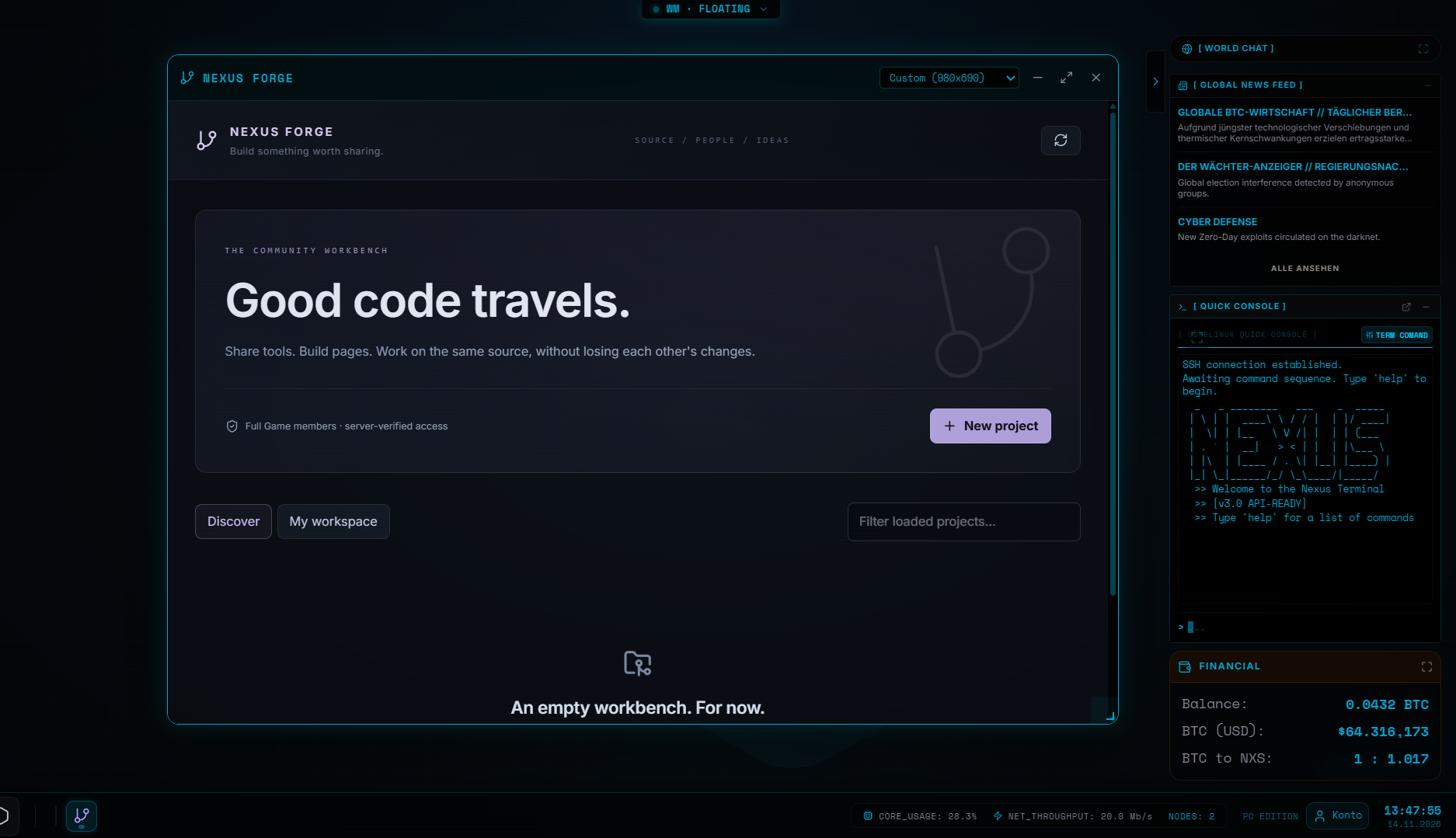
🔨 Nexus Forge — Publish, Collaborate, Host

Nexus Forge is a new home for player-made tools and code projects, reachable at forge.deep, through the Hidden Wiki, or as its own desktop app in the Coding folder.

  • Publish source directly from the JavaScript Editor, Python Editor or HTML Studio — one button on each editor
  • Download other players’ projects straight into Nexus Downloads, or open them directly in the matching editor
  • Collaborate: invite other Nexus players by username, edit shared files together, and commit versioned snapshots with built-in conflict protection so two simultaneous saves cannot silently overwrite each other
  • Project visibility: listed, unlisted, or private (members only)
  • Live pages: publish HTML / CSS / classic-JS projects as isolated live previews in a sandboxed iframe at forge.deep/live/<project-id>. Python and shell stay as readable source.
  • Server-enforced limits: up to 5 owned projects, 30 source files and 100 KB per project, 8 members, 20 retained revisions per project
  • Full Game required for publish, download, live pages and collaboration

🌿 Terminal Git Integration

The terminal now speaks real Git.

  • git init, add, commit, status, log, config, remote, branch, push, pull, clone all work on actual Git objects, index, refs and commits — this is a real local Git using isomorphic-git, not a scripted imitation
  • Local repositories work fully offline
  • Remotes connect to Nexus Forge at Forge.deep<id>.git — push a committed snapshot, pull the latest, or clone an existing project
  • Online Git operations require Full Game and an active profile; offline attempts return a clear mode message instead of a confusing network error
  • The terminal help command now carries a broader, themed command reference that stays complete even in a short session

Branches are limited to main for this first pass — no arbitrary branching, merging, force-push, SSH, or GitHub wire protocol. The point is a usable Git-to-Forge bridge, not a general-purpose Git host.

🧰 Minitools — Your Tool Launcher on the Desktop

Minitools is a new app in the Tools folder that gathers every tool and payload you own in one place. Instead of digging through menus or the old Extensions list, you open Minitools and see the whole library at a glance.

  • Searchable library — filter by tool or payload and find the one you need without scrolling
  • Native desktop windows — one click opens the tool’s actual interface in its own window. Multiple tools can run side by side, get moved, resized, minimized, or arranged through the Linux Window Manager just like any other Nexus app
  • Full taskbar and workspace support — every open tool shows up in the taskbar and respects the four workspaces, the same way a normal app does
  • Market shortcut — the built-in market button opens Silk Road directly
  • Non-destructive — the existing Extensions access path and every tool’s original interface are untouched. Minitools is an additional way in, not a replacement. Reopening a tool focuses its existing window instead of spawning duplicates; minimized tools stay mounted so their state is preserved.

Newly purchased tools — land in Minitools automatically after download. Tools you already owned before this release are already in there.

🪙 Three Monero Tools on Silk Road

Silk Road has a new Monero Tools section. Three tools are live, all priced in XMR:

  • GhostCopy — 1 000 XMR. Desktop SSH / SCP file client. Connect to a server with a discovered deployment key, browse the directories your account can actually reach, inspect files, and transfer them into Nexus Downloads. Server permissions, downtime and SCP rules all apply — this is not a backdoor, it is a real file client that respects the simulated environment. GhostCopy remembers every server you’ve connected to (synced with your save), shows whether it is online, and marks what your deploy account is allowed to edit. A new targeted search finds matching strings inside a chosen website’s files (minimum 4 characters, 5 searches per 10 minutes) and surfaces the built-in flaws with precise descriptions.
  • ScriptOps — 1 000 XMR. Runs real Bash scripts in a sequential queue with genuine shell output, exit codes, measured runtime and cancellation. Three tabs: Editor for writing and editing scripts directly in the tool, Builder for clicking a script together from existing game-command steps (status, botnet nodes, heat down, task assign, mail, tools, leaks, VPN status, page fetch, wait, text output, chained scripts) with loops and pauses, and Queue for re-running jobs and copying or saving output. Builder scripts save as normal shell scripts, editable later in the Editor tab.
  • Email Bomber — 2 000 XMR. Reads any text file (including ones you create yourself), parses the mailboxes inside, and delivers the chosen payload to every valid in-game mailbox. Works with every mailing list Silk Road and OX now sell, as well as with your own exports.

GhostCopy and ScriptOps both offer a 5-minute test run before purchase; unused test time is saved across sessions, and after it expires the next test is available in 7 hours (counter runs even when the game is closed). Email Bomber has no test mode. Tip for saving Monero: Try modifying the test cooldown in the browser console.

🎯 Hackable Server Flaws Across the Simulated Web

In the simulated web, intentionally built-in security vulnerabilities also await curious players. Those who take a closer look at page servers and the browser console can discover flaws that actually affect existing game mechanics—including selected shop offers, accesses, and limits.

GhostCopy’s targeted search surfaces these flaws when they appear in files — the practical starting point for anyone wanting to dig into the server side.

📧 OX Email Lists and Silk Road Mailing Lists

The economy around recruiting bots moved from direct purchases to real mailing-list workflows.

OX Market no longer sells bots directly. Instead, it offers two downloadable email lists:

  • 100 addresses for 1 BTC
  • 25 addresses for 0.035 BTC

Mostly L1 and L2 mailboxes, used with existing mail payloads through SecureMail or the new Email Bomber.

Silk Road carries three mailing lists as TXT files, each one-time purchasable:

  • 75 private mailboxes — 0.56 BTC (Digital Goods; mostly L1 / L2, occasional L3, two L4)
  • 250 corporate mailboxes — 500 XMR (Monero section; more L3, over ten L4)
  • 30 military mailboxes — 500 XMR (Monero section; 28 L4 and 2 L5)

💠 Level 5 Bots

A new top-tier node. L5 bots are super rare, cannot be gained through propagation at all, and are the strongest nodes for Monero mining, defense and hacking. They don’t carry their own drop chances, but they increase the dataset chance on any PC that hosts one.

🔧 Smaller Changes and Fixes

  • Full Game replaces Pro throughout the UI. Existing keys and accounts stay valid, price and features unchanged — it is a name change.
  • Aether offers a grouped selection of 56 network targets, direct access to the Monero Tools, and a much-expanded terminal reference with practical shell examples
  • JavaScript templates now run correctly as JavaScript and can be restarted
  • Saved Python apps keep their helper files intact across saves
  • Each Coding folder app now has its own distinguishable icon — HTML Studio (page layout), JavaScript Editor (curly braces), Python Editor (script file), HTML Live Player (preview monitor). Nexus Forge keeps its branch icon. Consistent across folder, taskbar and window titles.
  • Casino.ork, Quantum Casino and Neon Slots show an 18+ confirmation on first open (simulated gambling, virtual currency, no real data collection)
  • Windows can now be dragged all the way down to the taskbar at any zoom level without sticking
  • Mobile keyboard no longer pops up on its own on game start, browser, YouTube, start menu or the account window — only when you tap a text field
  • Trial bar on mobile stays single-line with timer, account and Full Game purchase all visible
  • Trial saves now load without waiting on an online version check; Full Game saves start faster thanks to bundled license checks and fewer startup cloud queries
  • Faster recovery: temporary connection problems during start no longer silently switch your profile

Stay safe in the deepnet. The grid is alive.

Thanks for sticking around!

▸ Play it now:

Screenshot 2026 11 12 201009

Leave a Reply